I had a showing to run and didn't want to do any of the work
One sentence to AI built a showing calendar for my rental, Mondays only, 15-minute slots, three people per slot. Then Meta's Muse posted the Marketplace listing and answered every message. Here is the whole setup, and the part you still do yourself.
Prefer audio? Listen to this episode on the podcast.
If you’ve ever listed a rental, you know how it goes. You post it on Facebook Marketplace, and within a day thirty people are asking “is this still available?” Each one wants a time. Half of them want a different time. Some of them never show up.
I had a property to rent and a showing to run, and I didn’t want to do any of that back and forth. So I handed it to AI. This post is the setup from the video above, step by step, plus the one thing I’d watch for if you try it.
The 80/20 for a rental showing
Getting people booked, telling them where to be, and answering the same five questions over and over: AI can run all of that. Opening the door and meeting the person is still you.
You keep the part that needs a person, and your evenings stop disappearing into Messenger.
Step 1: tell AI what the showing calendar should be
I use GoHighLevel as my CRM because the calendar, the text messages, the contacts and the payments all live in one place. I connect Claude to it, so Claude can work inside the account instead of just giving me advice.
Then I said what I wanted, out loud, the way I’d say it to an assistant:
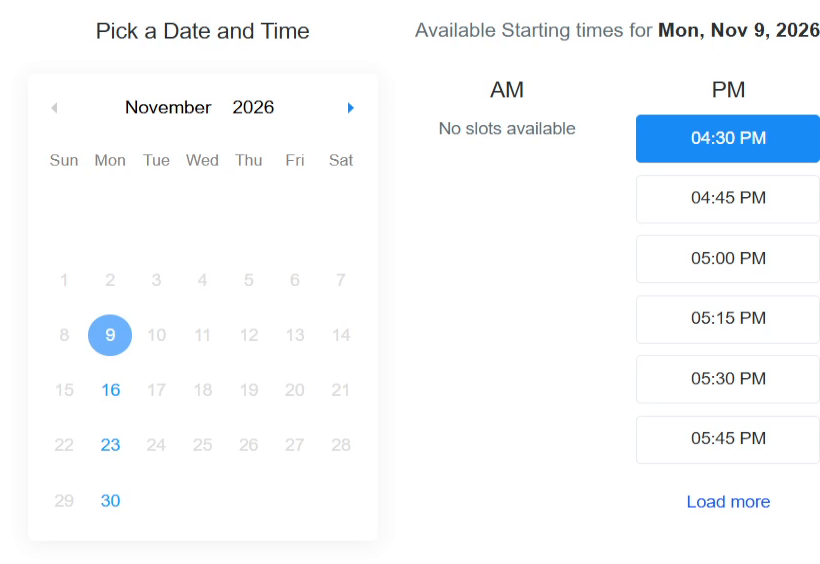
Find my demo real estate sub-account and create a calendar for a new listing at 54 Main Street. Only Mondays can be booked. On Mondays, bookings are between 4:30 pm and 6 pm, and each slot is 15 minutes.
Claude found the sub-account, set the calendar to Central time, named it “54 Main Street Showing”, and gave me the booking link. It also picked a few sensible settings I never mentioned: at least two hours’ notice, bookings open up to 30 days ahead, and only one slot left open at 5:45, because a 15-minute showing that starts at 5:45 ends at 6.
The booking page asks for a first name, last name, phone and email. Those are the four things you need to know who’s coming and how to reach them. Claude chose that form on its own.
Step 2: make a change, and check it actually happened
People cancel showings all the time. I didn’t want to stand in an empty apartment for 15 minutes, so I asked for three people per slot.
Before sending that, I opened the calendar’s booking rules in the CRM. Maximum bookings per slot said 1. Then I sent the ask. Claude made the change and told me something went wrong with its first try: saving that one setting quietly reset the slot length, so it put the 15 minutes back and checked again. When I refreshed, maximum bookings per slot said 3.
I like that it told me. If it changes something in your account, you want to hear about it.
Step 3: put the link where people already are
Copy the booking link into the Marketplace listing description: “To book a showing, use this link.” When someone messages you, the reply is the same link. Nobody has to text you to find a time.
If you rent more than one place, give each property its own calendar. Mondays for this one, Tuesdays for that one. When a unit rents, ask AI to turn that calendar off.
The bonus: Muse answers the Marketplace messages
This is the part that made the biggest difference for me on my own rental.
Muse is Meta’s AI. You sign in with your Facebook account, and it can work with your profile, Marketplace and messages. I asked it to create the listing, and it put the booking link in. I gave it the questions I ask everyone before a showing. Every time someone wrote “is this still available?”, Muse drafted the reply with my questions and pointed them at the link. I clicked approve, and it sent.
It also kept track of the quiet ones. It would tell me, “three people got the information and haven’t replied, should I follow up?” One approve and the follow-ups went out. Then I asked it to check for new messages every two minutes and answer them, so I wasn’t sitting on Messenger all evening.
One thing to watch
When AI sets the hours on a calendar, check that it made one entry per day. If the open hours get bundled into one rule for several days, the slots come out wrong. Open the booking page in a new tab after any change and look at it the way a renter would. That habit catches almost everything.
The prompt
Here’s the prompt from the video, cleaned up. Swap the parts in brackets for your property:
Find my [sub-account name] sub-account and create a calendar for a new listing at [address]. Only [day] can be booked, between [start time] and [end time], in [time zone]. Each slot is [15] minutes, and up to [3] people can book the same slot. Name it “[address] Showing” and give me the booking link.
If you want this set up for you
If you rent out a few properties and want the showings, links and messages handled, send me a note through the form or leave a comment on the video. Tell me how many units and where you post them, and I’ll tell you what I’d set up first.
Tell me what's broken. I'll set it up.
Two sentences about what is not working is plenty. I read every one and I'm usually back to you the same day.
Do it yourself, free
Every fix is on YouTube. Sign up for GoHighLevel with my link to support the channel, and I'll map what to build first for your business.
Turn off ad blockers before clicking or the referral will not track, and then I cannot see you signed up.