She cancelled. The system thanked her for coming in.
A clinic wired its medical software to its CRM so a thank-you text would go out after every appointment. Then one patient got four texts in a day, and one went to someone who never showed up. The webhook was doing exactly what it was told.
Prefer audio? Listen to this episode on the podcast.
A clinic I work with wanted one simple thing. When a patient finishes an appointment, send them a thank-you text. Nice touch, easy to set up, the kind of automation everybody builds in the first week.
So we did. Their medical software has an outbound webhook, an event called something like “after appointment.” You paste in the CRM’s inbound webhook address, fire one test, map the fields, add the text. It worked on the first try. Perfect, for about a day.
Then the front desk started getting complaints. One patient had received four thank-you texts in a single day. She came in once. And the worst one went to a patient who had cancelled and never set foot in the building.
“After appointment” does not mean the appointment finished
Here is the thing nobody tells you about webhooks. The event name is not a promise. It is somebody else’s shorthand.
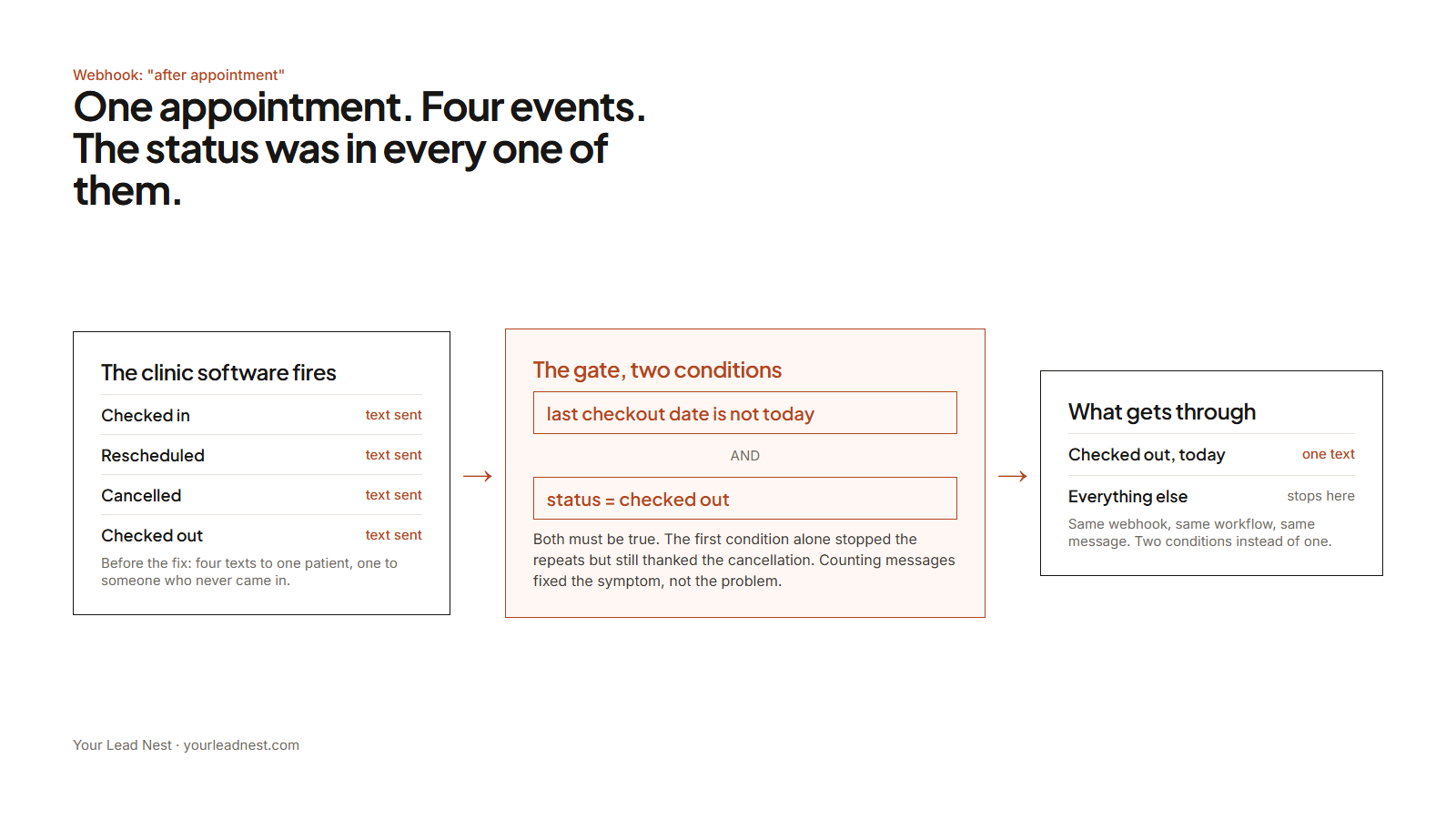
“After appointment” did not mean “the appointment is done.” It meant “something happened to this appointment.” Checked in? Fires. Checked out? Fires. Rescheduled? Fires. Cancelled? Fires. Four events, one patient, one day, and every one of them landed in the same workflow and sent the same text.
And the crazy part is the answer was sitting in the payload the whole time. Every one of those events carried the appointment status. We just were not reading it, because the event name sounded like it had already done that job for us.
The first fix, which did not work
My first move was the obvious one. Stop the repeats.
I added a custom field on the contact, last checkout date. The workflow checks it: if it is empty or not today, update it, wait fifteen minutes, then send. If it is already today, stop. Four texts became one.
Still wrong. The patient who cancelled still got her one text, because she still had an event that day. One wrong text is still a wrong text, and in a clinic it is the one that gets noticed. I had solved the symptom, which was the count, and not the problem, which was that we were thanking people who had not come in.
Got an automation that fires more than it should? Send me a screenshot of the workflow. Most of these are one condition away from right.
Show me the workflow →The fix that holds
The condition needed a second half.
Send only if the date check passes AND the appointment status is checked out. Both true, or nothing happens. Same integration, same webhook, same text. Two conditions instead of one, and every other event quietly stops at the gate.
That is the whole fix. It took longer to find than to build, which is how most of this work goes.
What to take from this
If you are wiring any two systems together, do not trust the name of the event. Fire it, read the actual payload, and look hardest at the fields you think you do not need. The status field looked optional right up until it was the only thing that mattered.
And if you run a clinic or any business where a wrong message costs you trust, this is why I say systems have to fit how you actually operate. The software was fine. The setup was textbook. It just did not know what “finished” meant in that building.
If you have a version of this, an automation that fires more than you expect and you cannot see why, put it in front of me. Comment on the video, send it through the form, or bring it to the HighLevel Canada group where I fix one of these on screen every week.
Tell me what's broken. I'll set it up.
Two sentences about what is not working is plenty. I read every one and I'm usually back to you the same day.
Do it yourself, free
Every fix is on YouTube. Sign up for GoHighLevel with my link to support the channel, and I'll map what to build first for your business.
Turn off ad blockers before clicking or the referral will not track, and then I cannot see you signed up.